정적 컨텐츠, MVC와 템플릿 엔진, API가 있는데 템플릿 엔진과 API만 기억하면 된다.
이 둘은 html로 내리냐, 데이터로 내리냐의 차이다.
1.정적 컨텐츠
@GetMapping("hello")
public String hello(Model model){
    model.addAttribute("data","hello!!");
    return "hello"; //얘한테 가서 렌더링해라
}
<!DOCTYPE HTML>
 <html>
 <head>
    <title>static content</title>
    <meta http-equiv="Content-Type" content="text/html; charset=UTF-8" />
 </head>
 <body>
정적 컨텐츠 입니다.
 </body>
</html>그냥 파일을 그대로 내보내는 것
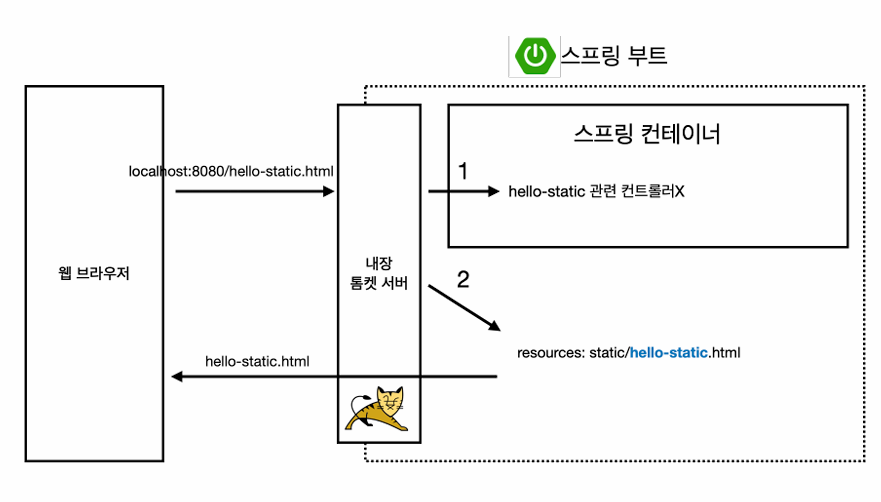
hello-static 컨트롤러를 먼저 찾아본다. 즉 컨트롤러가 우선순위를 가진다.
없으니까 hello-static.html을 찾아서 웹브라우저로 보냄
2.MVC와 템플릿 엔진
@GetMapping("hello-mvc")
public String helloMvc(@RequestParam(name="name") String name,Model model){
    model.addAttribute("name", name);
    return "hello-template";
}@RequestParm(name="name")보면 두가지가 가능하다.
@RequestParam(name="name", required = true)

@RequestParam(name="name", required = false)required가 없으면 default true라서 name=" " 이 필수다. false면 없어도 된다.
이 부분 프로젝트 할 땐 잘만 활용했는데 강의로 다시 잡으려고 하니 조금 까먹어서 긴가민가하다 ** 다시 보충해야지
etc.파라미터 정보 단축키 컨트롤+p
<html xmlns:th="http://www.thymeleaf.org">
<body>
<p th:text="'hello ' + ${name}">hello! empty</p>
</body>
</html>
템플릿 엔진으로 html을 프로그래밍해서 렌더링된 html을 고객에게 전달
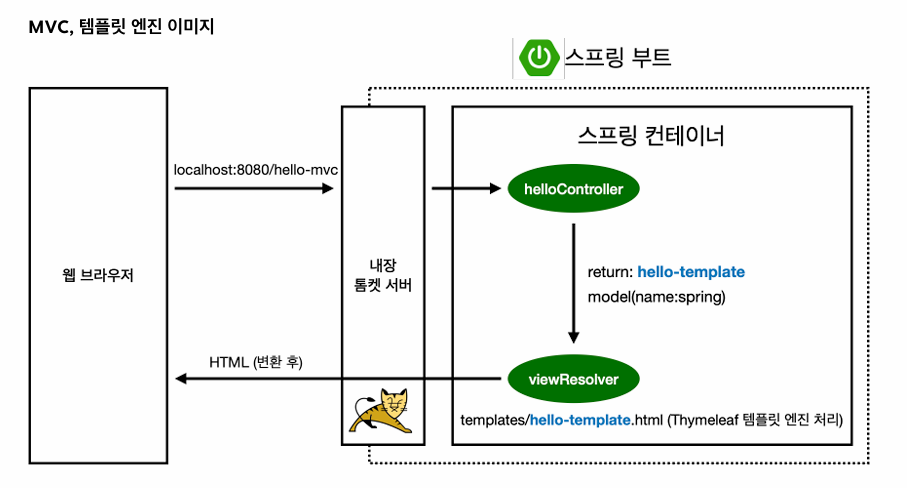
viewResolver가 움직이는 것을 볼 수 있다.
3. 1 API
@GetMapping("hello-string")
@ResponseBody
public String helloString(@RequestParam("name") String name){
    return "hello "+name; //"hello spring"
}
데이터만 내려줄 때 이용한다
2번에서 다룬 뷰템플릿을 조작하는 방식

html 형식이 내려온다.
3번 Api 방식
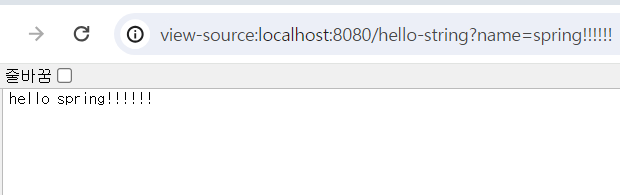
@ResponseBody 붙였기때문에 문자 그대로 나온다. 데이터를 그대로 내려보내는 형식
@ResponseBody 뜻
:http는 헤더부와 바디부로 나뉘는데 내가 return 내용을 직접 바디부에 넣겠다
html 형식이 내려가지 않고 요청한게(hello spring!!!) 그대로 내려감
3. 2 실무에서 사용하는 API 방식
객체를 반환하는 것이 포인트다.
//api 방식
@GetMapping("hello-api")
@ResponseBody
public Hello helloApi(@RequestParam("name") String name){
    Hello hello = new Hello();
    hello.setName(name);
    return hello;
}

static class Hello{
    private String name;

    public String getName() {
        return name;
    }

    public void setName(String name) {
        this.name = name;
    }
}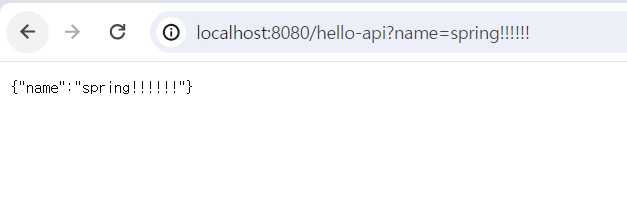
JSON 형태로 나온다. key-value로 이루어진 구조
@ResponseBody이고 객체 반환이면 기본적으로 JSON으로 반환한다
static class Hello{
    private String name;

    public String getName() {
        return name;
    }

    public void setName(String name) {
        this.name = name;
    }

}
public String getName() {
        return name;
    }

    public void setName(String name) {
        this.name = name;
}이 부분을 자바 빈규약이라고 함, 프로퍼티 접근 방식
name 변수가 private 설정되어있어서 외부에서 바로 못꺼내는 대신 public 메서드를 통해 접근할 수 있도록 함
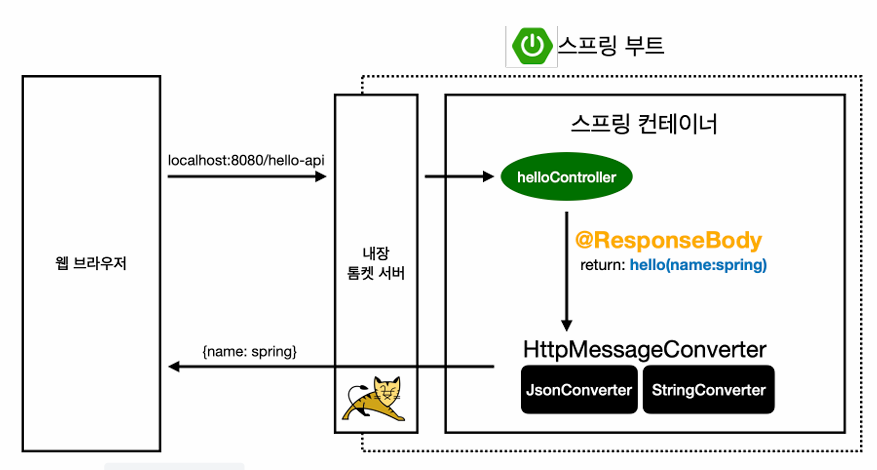
문자를 준다면 http 응답에 문자 그대로 넣어서 전달하는데 객체를 준다면 디폴트가 JSON 방식으로 데이터를 만들어서 http에 반환한다.
객체면 JsonConverter, String이면 StringConverter가 동작함
객체니까 JSON 스타일로 바꿔서 웹브라우저한테 보낸다
객체를 JSON으로 바꿔주는 대표적인 라이브러리 : Jackson
즉 API 방식은 객체 반환
번외 꿀단축키 모음(윈도우)
파라미터 정보 컨트롤+p
문장 끝 완성 단축키 컨트롤+시프트+엔터
'Springboot' 카테고리의 다른 글
| 김영한 스프링 입문 섹션 4.컴포넌트 스캔과 자동 의존관계 설정 정리 (1) | 2024.03.08 |
|---|---|
| 김영한 스프링 입문 섹션 3. 회원 관리 예제 실습 정리 (0) | 2024.03.07 |
| String 을 LocalDate 바꾸는 법 (0) | 2024.01.20 |
| Spring boot 구글 소셜로그인 OAuth 로그인 구현 (0) | 2024.01.10 |
| Spring boot github 잔디같은 기능을 프로젝트에 구현하자 (0) | 2024.01.04 |